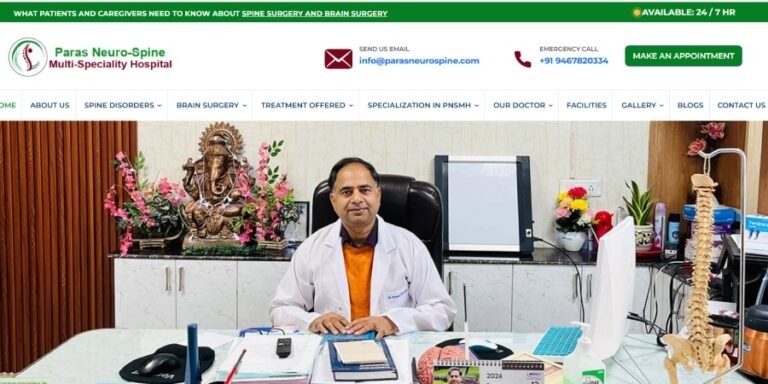
Paras Neuro Spine Hospital
https://parasneurospine.in/
View projectA WordPress website needs attention after it goes live. Updates, plugin changes, broken forms, slow pages, security checks and small content or development requests can quickly become someone else's problem. I provide practical WordPress maintenance and development support so your website stays usable, secure-minded and ready for the next change.
WordPress maintenance that includes development
WordPress maintenance is not just a monthly update checklist. Your theme, plugins, forms, integrations and custom code all interact. When something changes, someone needs to understand what is affected. I combine ongoing maintenance with hands-on WordPress development when a simple update is not enough.
Review WordPress, themes and plugins with attention to compatibility instead of blindly updating everything on a production website.
Broken layouts, forms, plugin conflicts, PHP errors and unexpected website behaviour can be investigated and fixed by the developer.
New plugins, content and scripts can gradually make a website heavier. Maintenance can include reviewing those changes before they become bigger problems.
Keep an eye on backups, access, plugin dependencies, custom code and other parts of the WordPress setup that matter to the site.
WordPress maintenance services
Some maintenance tasks take minutes. Others need proper investigation and code. The support can cover both, depending on what your website actually needs.
Keep the core, themes and plugins maintained while checking for compatibility with the existing website setup.
Investigate website errors, broken functionality, plugin conflicts and frontend problems instead of applying random fixes.
Review the parts of the website that are making pages heavy or slow and work on practical improvements.
Review the basic safeguards and website condition so a small technical problem does not become a larger recovery task.
Maintenance does not have to stop at fixes. Add sections, improve templates, develop features or change existing functionality as the business grows.
Support stores where products, orders, payments, checkout and integrations make maintenance more than a standard WordPress update.
If I already understand the theme, plugins, custom code and important website journeys, it becomes much easier to investigate an issue when it appears. That context is useful whether you need regular support or occasional help.
Something stopped working and you need someone who can get into the WordPress setup, understand the issue and fix it without guessing.
Keep a developer familiar with the website for regular updates, improvements, fixes and new development instead of starting from zero every time a task comes up.
What I can look after
WordPress projects often have a mixture of standard plugins, custom templates, forms, third-party services and business-specific code. Maintenance works better when those pieces are considered together.
Keep an eye on important pages, forms and functionality so changes can be investigated before they become business problems.
Remove or review unnecessary plugins, old functionality and technical clutter when the website needs a cleaner foundation.
Small frontend changes can make a meaningful difference when a page works on desktop but not on a phone.
Technical changes can be made with awareness of important URLs, content, internal links and search-facing website structure.
Flexible support
Not every website needs a large maintenance contract. Support can be arranged around ongoing needs, planned development or individual technical tasks.
For businesses that need a developer when something breaks or a specific website improvement comes up.
For businesses that want a developer familiar with the website for regular maintenance and continuing improvements.
For growing websites that need more than maintenance — including new features, integrations, redesigns and technical improvements.
How I handle maintenance
The goal is not to touch the website every month just to call it maintenance. It is to keep the setup understood, make necessary changes carefully and spend development time where it improves the website.
Review WordPress, theme, plugins, custom code, integrations and the website areas that matter to the business.
Separate updates, fixes, performance tasks and new development so important website issues are handled first.
Apply updates, fixes or development with awareness of existing functionality and the possibility of plugin conflicts.
Test important pages, forms, responsive layouts and key functionality after significant maintenance or development changes.
Selected WordPress work
Explore the wider portfolio for WordPress, WooCommerce, Shopify and custom web development work. Many maintenance tasks eventually become development tasks.
https://parasneurospine.in/
View project
https://poshindia.co.in/
View projectWhy work directly with me
When a website has custom PHP, WooCommerce logic, APIs or a customized theme, routine maintenance can quickly turn into development. Working directly with the developer makes it easier to solve the actual problem instead of passing the task between support teams.
Explain the issue directly to the developer who can inspect the website and work on the solution.
Hands-on work across WordPress, WooCommerce, PHP, APIs, frontend development and custom websites.
Experience across business websites, eCommerce stores, custom functionality and ongoing development work.
Use ongoing maintenance, project-based development or technical help when your website needs it.
Frequently asked questions
If you already have a WordPress website and are unsure what level of support you need, send the website and tell me what you want help with. We can start from the current setup.
Need someone to look after your WordPress website?
Send your website, current issues or the kind of support you need. We can turn it into a practical WordPress maintenance and development plan.





Let's build
Frontend, backend, storage — or all three. I'm just a message away.