




“Advertising is changing.”
For years, businesses have relied heavily on search engines and social media to find potential customers. Someone searches for a keyword, sees an advertisement, clicks it and visits a website.
But AI-powered search and conversational platforms are creating a different advertising opportunity.
ChatGPT Ads are designed to reach people while they are exploring, comparing and making decisions inside a conversation. OpenAI says its advertising system considers signals such as the current conversation and intent, the ad’s landing page, title, copy, advertiser-provided context hints and targeting selections. OpenAI Help Center
That makes ChatGPT advertising particularly interesting for businesses selling services, software, eCommerce products and other solutions where intent matters.
In this guide, we’ll cover:
- What ChatGPT Ads are
- How ChatGPT advertising works
- How ChatGPT Ads differ from Google Ads
- How to create your first ChatGPT ad
- How to choose a campaign objective
- How to create an ad group
- How context hints work
- How to create your ad
- How to choose your landing page
- How to set your budget
- How to track clicks and conversions
- Practical tips for getting better results
What Are ChatGPT Ads?
ChatGPT Ads are paid advertising placements that can appear below ChatGPT responses.
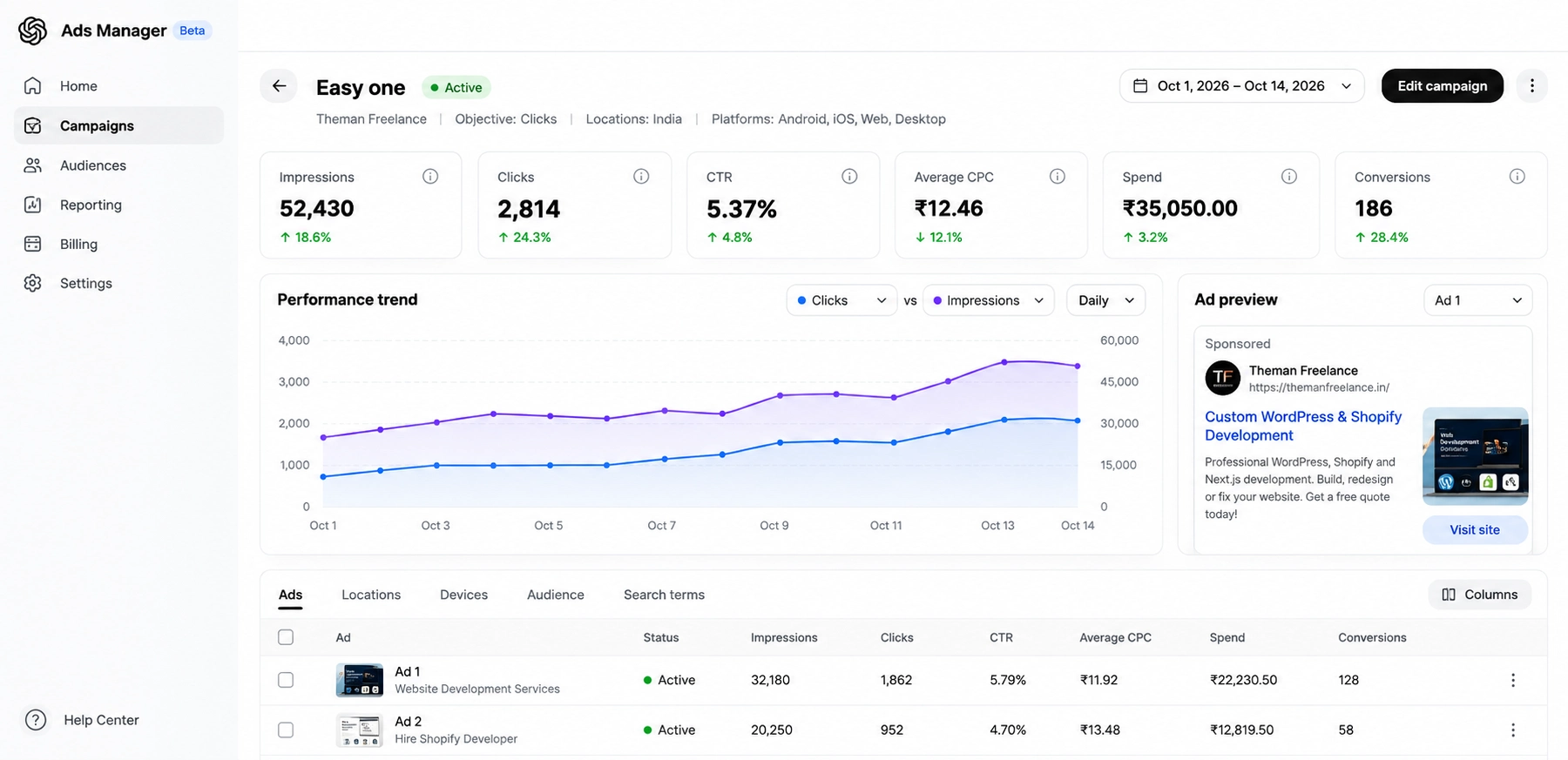
An ad can contain:
- Advertiser name
- Logo/favicon
- Ad headline
- Ad description
- Landing page
- Image creative
OpenAI says ads are clearly labeled and separated from ChatGPT’s answer. Advertisers cannot influence or change ChatGPT’s responses. OpenAI Help Center
This distinction is important.
Your advertisement is a paid placement, while the ChatGPT response itself remains independently generated.
How Do ChatGPT Ads Work?
One of the biggest differences between ChatGPT Ads and traditional search advertising is the way relevance is determined.
Traditional search advertising often starts with a keyword such as:
“Shopify developer Delhi”
ChatGPT Ads can consider a broader combination of signals.
For example:
“I need someone to redesign my Shopify store and improve its conversion rate.”
The system can consider the conversation context and intent, along with the advertiser’s landing page, ad copy, context hints and targeting. Context hints can describe conversations, topics or keywords where an offering may be relevant, but OpenAI explicitly says they are not exact-match keywords and don’t guarantee delivery in a specific conversation. OpenAI Help Center
This means advertisers should think about:
Customer problem → Customer intent → Relevant offer → Relevant landing page
rather than simply:
Keyword → Advertisement
ChatGPT Ads vs Google Ads
There is an important difference between the two.
| ChatGPT Ads | Traditional Search Ads |
|---|---|
| Conversation-driven | Search-query driven |
| Considers conversational intent | Strongly centered around keywords/search terms |
| Context hints can guide relevance | Keyword targeting is central |
| Ads appear within ChatGPT experience | Ads appear on search results/pages |
| Useful for decision-stage conversations | Useful for active search intent |
| Landing-page relevance matters | Landing-page relevance matters |
| Can support CPC/CPM/conversion objectives | Depends on advertising platform |
This doesn’t mean ChatGPT Ads replace Google Ads.
Instead, businesses can consider them as another acquisition channel.
Who Should Advertise on ChatGPT?
ChatGPT advertising can potentially be useful for businesses where customers spend time researching or comparing solutions.
Examples include:
Service businesses
- Web developers
- Digital marketing agencies
- SEO companies
- Design agencies
- Legal services
- Consulting companies
eCommerce
- Shopify stores
- D2C brands
- Fashion brands
- Jewelry stores
- Beauty brands
Technology
- SaaS products
- AI tools
- Developer tools
- Business software
- Productivity platforms
Local businesses
- Restaurants
- Clinics
- Education businesses
- Professional services
- Local agencies
The key question isn’t simply:
“Does my business have a website?”
Instead ask:
“Are potential customers using conversations to research a problem that my business can solve?”
How to Advertise on ChatGPT: Step-by-Step
Now let’s get into the practical part.
OpenAI’s current Ads Manager workflow uses three major levels:
Campaign → Ad Group → Ad
A campaign defines the overall objective, budget and targeting.
An ad group organizes ads around a particular theme or intent.
The ad contains the actual creative, headline, copy, landing page and image. OpenAI Help Center
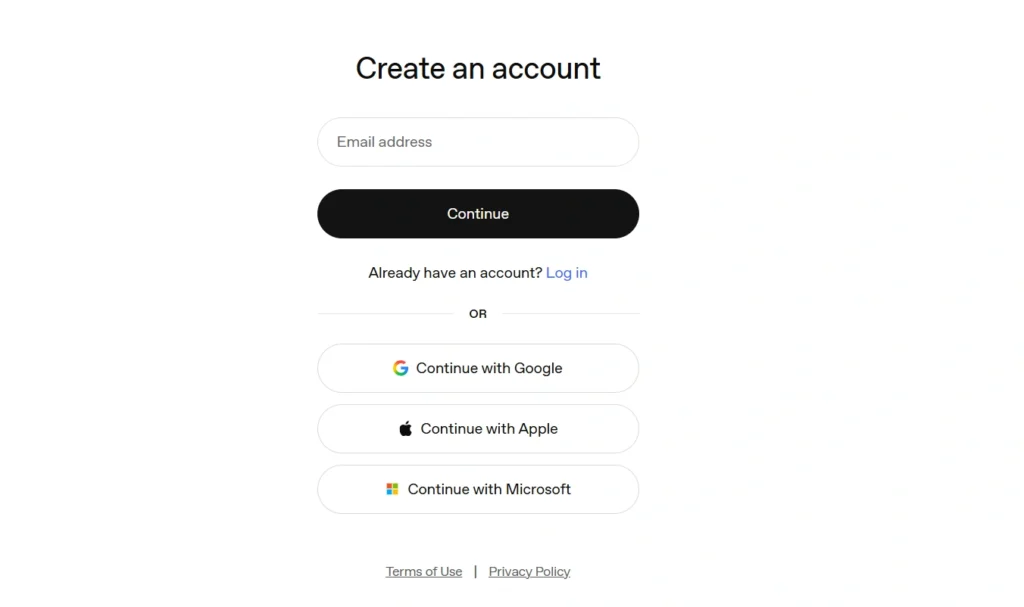
Step 1: Create Your ChatGPT Ads Manager Account
Go to:
OpenAI currently allows businesses to sign in or create an Ads Manager account using their OpenAI account. You can also start the setup by providing your website URL. OpenAI Help Center
You’ll need to complete your advertiser/account setup, including your business information and billing details before launching campaigns.
ChatGPT Ads Manager account setup screen.
Step 2: Create Your First Campaign
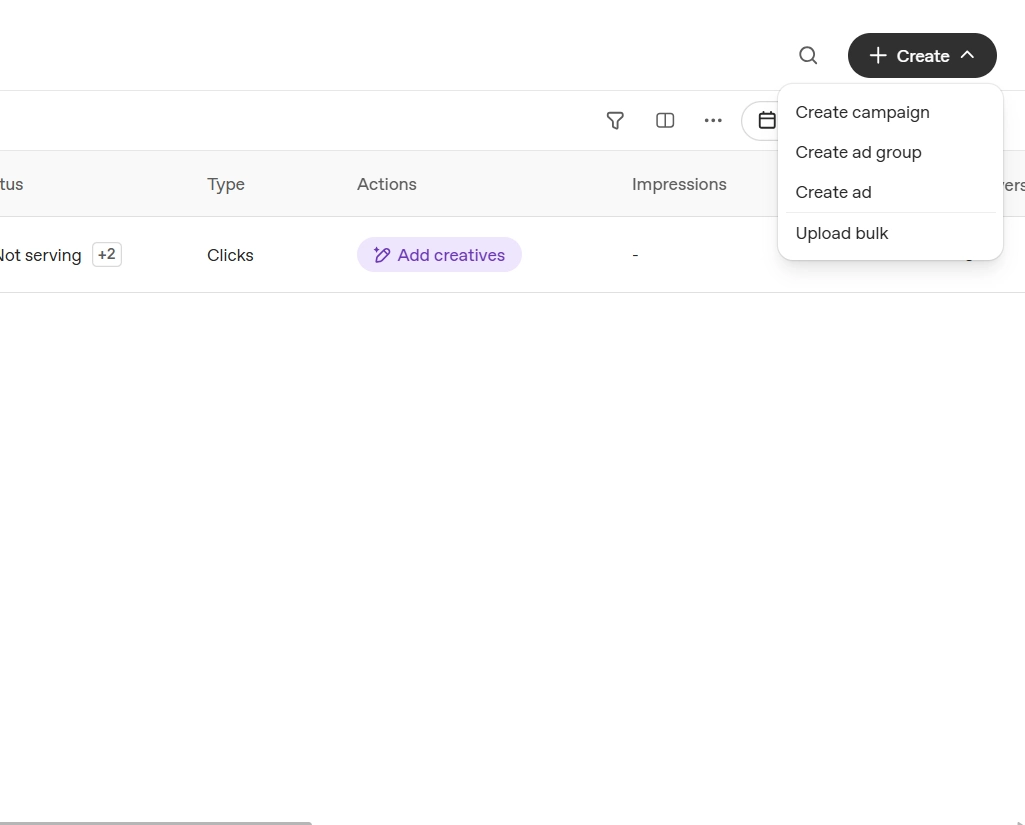
Once your Ads Manager account is ready:
Ads Manager → Create → Create campaign
OpenAI’s current campaign setup includes:
- Campaign name
- Objective
- Budget
- Start date
- End date
- Countries
- Platforms
- Optional custom audiences
- Conversion event when applicable OpenAI Help Center
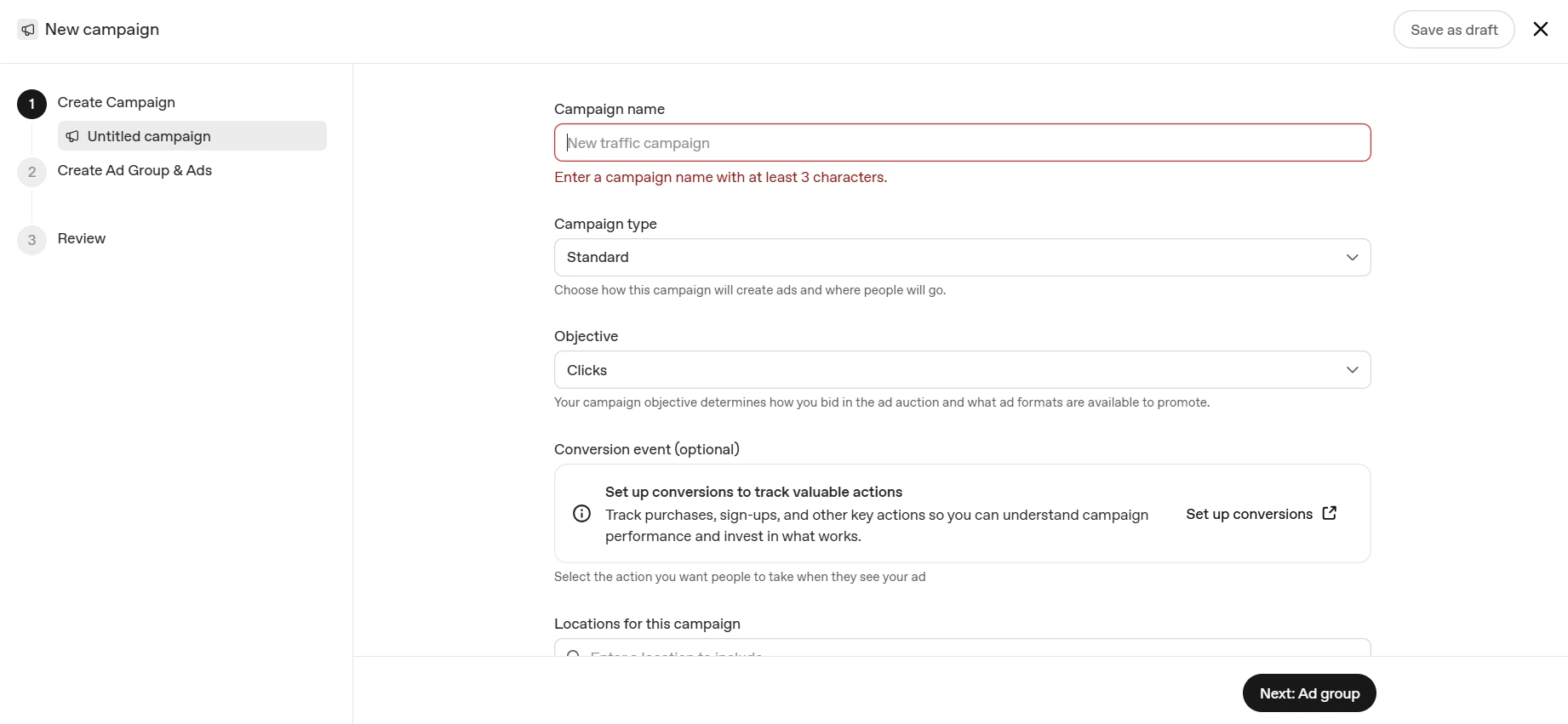
Step 3: Choose Your Campaign Objective
Your objective determines how your campaign is optimized and billed.
Current options include:
Views / CPM
Useful when your primary goal is:
Reach + awareness + visibility
You pay based on impressions.
Clicks / CPC
Useful when your goal is:
Website traffic + engagement
You pay per valid click.
Conversions
Useful when you want to optimize toward a supported conversion event.
OpenAI currently describes conversion campaigns as conversion-optimized buying, with supported billing models depending on the campaign setup. OpenAI Help Center
For a freelance developer
If your primary goal is getting website visitors and potential leads, I’d initially consider:
Clicks / CPC
Then move toward conversion optimization once you have enough reliable conversion data.
Step 4: Set Your Budget
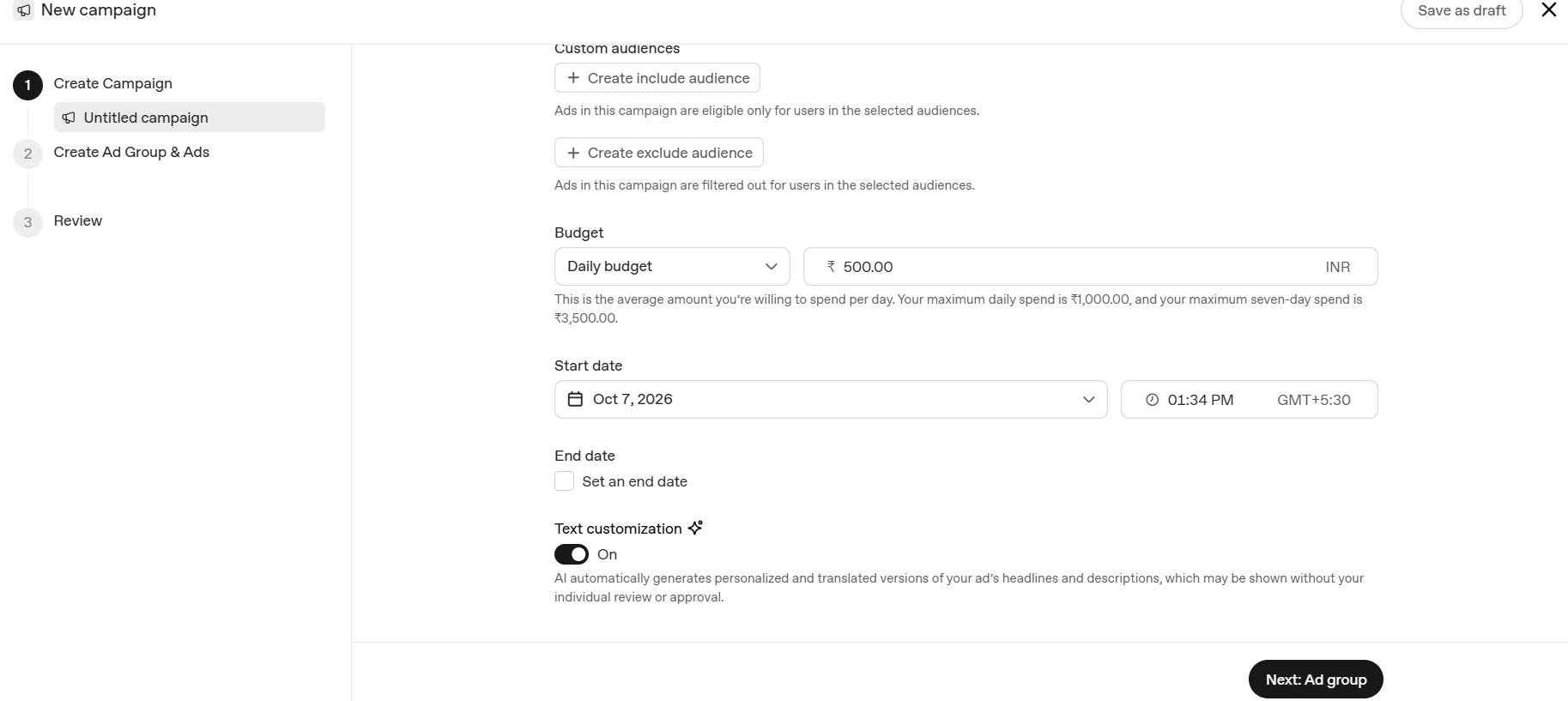
ChatGPT Ads Manager supports:
Campaign-total budget
or
Daily budget
A campaign-total budget gives you tighter control over the total amount spent across the campaign.
A daily budget is an average delivery target and actual daily spend can fluctuate within OpenAI’s stated limits. OpenAI Help Center
For India, OpenAI’s current documentation lists a minimum daily budget of ₹725 INR. This is subject to change, so check Ads Manager before publishing. OpenAI Help Center
Step 5: Choose Your Target Country
Country targeting determines where your advertisements are eligible to appear.
For example, if your business primarily serves India, you can select:
India
For an international business, you may select supported countries based on your account eligibility and campaign requirements. OpenAI notes that some new self-serve accounts may initially be restricted to their home country until additional eligibility requirements are met. OpenAI Help Center
Important
Don’t select every country simply because you can.
Your targeting should match:
Where you can actually sell or provide your service.
Step 6: Create an Ad Group
After creating the campaign, create an Ad Group.
Think of an ad group as a specific customer-intent category.
For example, for a freelance web development business:
Campaign
Web Development Leads
Ad Group 1
Shopify Development
Ad Group 2
WordPress Development
Ad Group 3
Website Redesign
Ad Group 4
eCommerce Development
This structure makes it easier to create different messages for different customer problems.
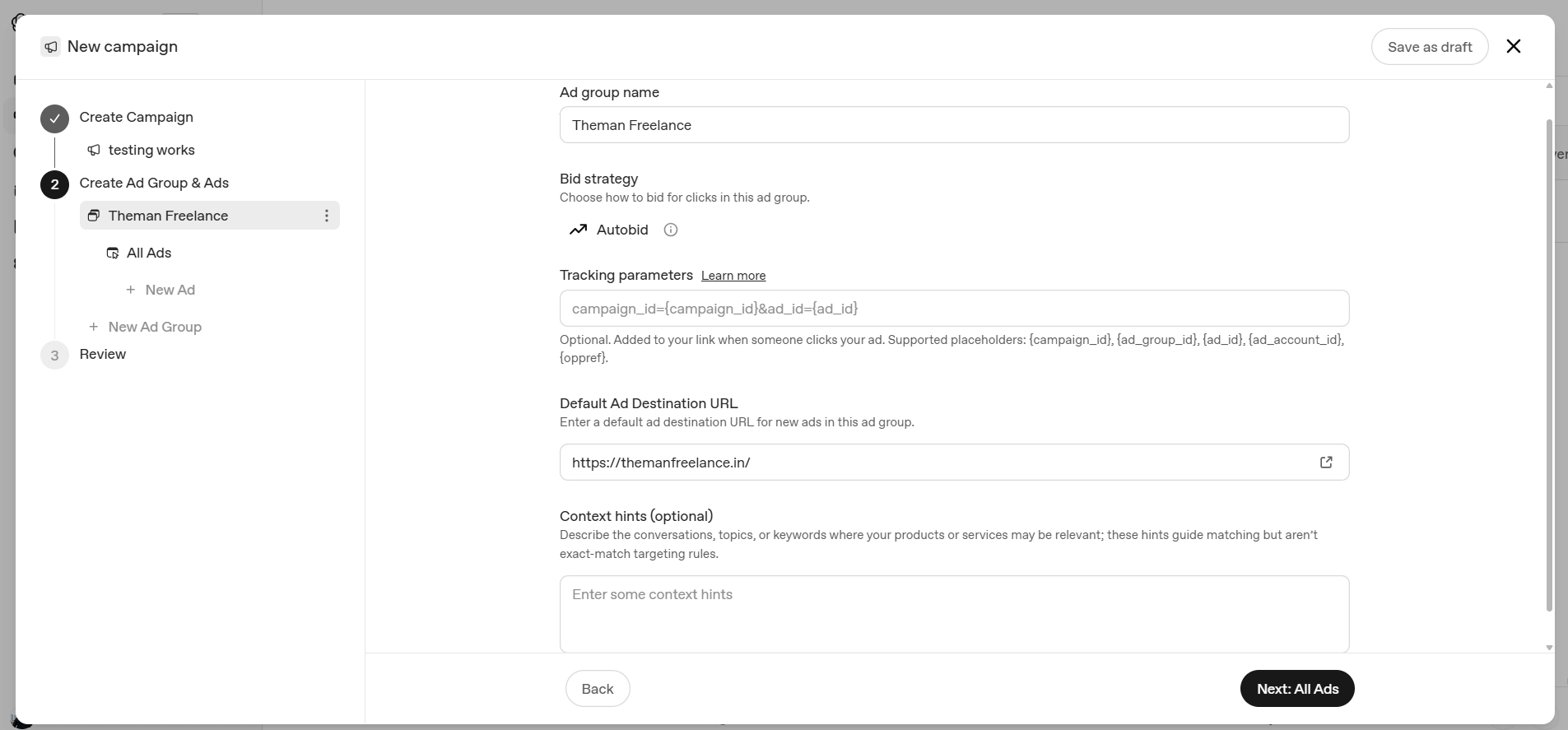
Step 7: Add Context Hints
This is one of the most interesting parts of ChatGPT advertising.
Context hints help describe the conversations, topics or situations where your product or service could be relevant.
For example, if you’re advertising Shopify development:
Context hints could include:
- Shopify developer
- Shopify store development
- Shopify theme customization
- Shopify website redesign
- Shopify Liquid developer
- Shopify product page customization
- Shopify API integration
- Shopify speed optimization
- Shopify eCommerce development
- hire Shopify developer
Better approach
Don’t only list keywords.
Think about real conversations your customers might have.
For example:
“I need help customizing my Shopify product page.”
“Who can redesign my Shopify store?”
“My Shopify store is slow. How can I improve it?”
Those represent customer intent, not just keywords.
Step 8: Create Your Advertisement
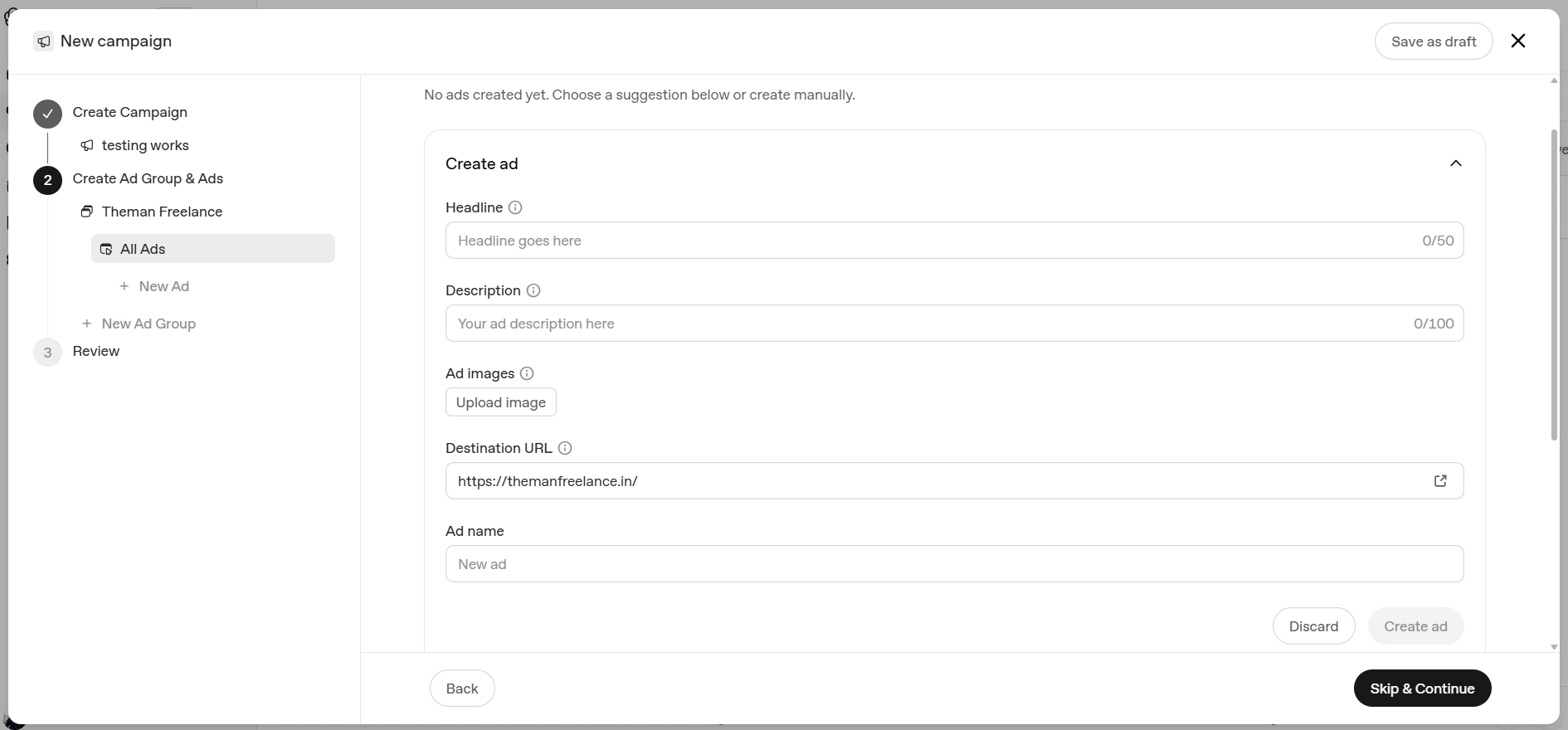
Now create the actual ad.
Start Enter ‘Headline’ it show all logo and image options too.
An ad includes:
- Brand name
- Logo
- Headline
- Description
- Landing page
- Image
OpenAI currently recommends concise ad titles and copy; its launch documentation lists 16–24 characters as a recommended title length, with a maximum of 50 characters, and 32–48 characters recommended for ad copy, with a maximum of 100 characters.
Example for TheManFreelance
Headline:
Shopify Developer
Description:
Custom Shopify builds by Hemant.
Landing page:
Your Shopify development/service page.
Another variation
Headline:
Hire Shopify Expert
Description:
Custom Shopify development & redesigns.
Step 9: Add Your Landing Page
Your landing page is extremely important.
Don’t automatically send every ad to your homepage.
Match the landing page to the intent.
Shopify ad
Ad → Shopify Development page
WordPress ad
Ad → WordPress Development page
Website redesign ad
Ad → Website Redesign page
Shopify CRO ad
Ad → Shopify Conversion Optimization page
This creates a simple journey:
Conversation → Relevant Ad → Relevant Page → Lead
OpenAI also considers the landing page as one of the signals used when selecting ads. OpenAI Help Center
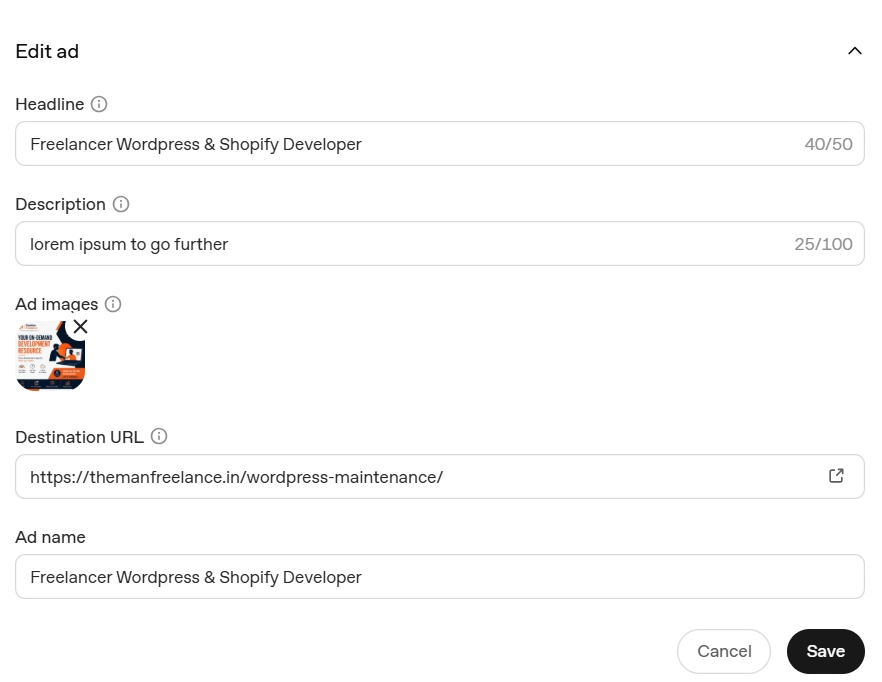
Step 10: Add Your Image Creative
ChatGPT Ads can include an image creative.
For example, a Shopify developer could use an image showing:
- Shopify storefront
- Product page
- Custom theme
- Conversion optimization
- Mobile shopping experience
Keep the creative connected to the service.
Don’t use a random stock image just because it looks attractive.
Your creative should communicate:
What you offer + who it’s for + why it matters.
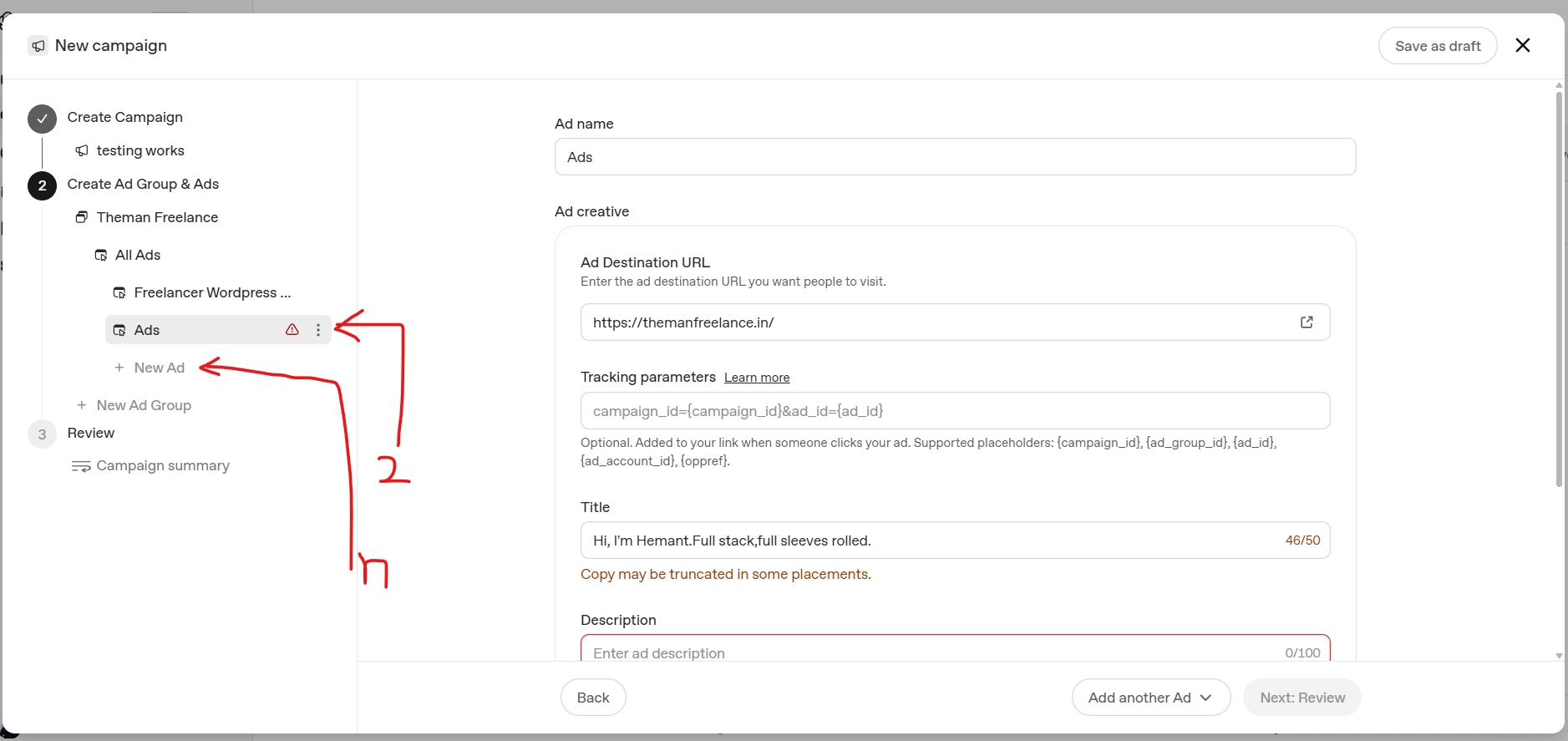
Step 11: Add Multiple Ad Variations
Don’t create only one advertisement.
For example:
Ad 1 — Custom Development
Shopify Developer
Custom Shopify builds, Liquid development and integrations.
Ad 2 — Redesign
Shopify Store Redesign
Improve your Shopify store’s UX, speed and conversions.
Ad 3 — Performance
Faster Shopify Store
Improve speed, UX and performance with custom development.
Different variations give the system more messaging options.
Step 12: Review and Submit
Before launching, check:
- Campaign is active
- Correct objective selected
- Budget is correct
- Country targeting is correct
- Ad group is correct
- Context hints are relevant
- Ad headline is clear
- Ad description is accurate
- Landing page works
- Image is accessible
- Billing is complete
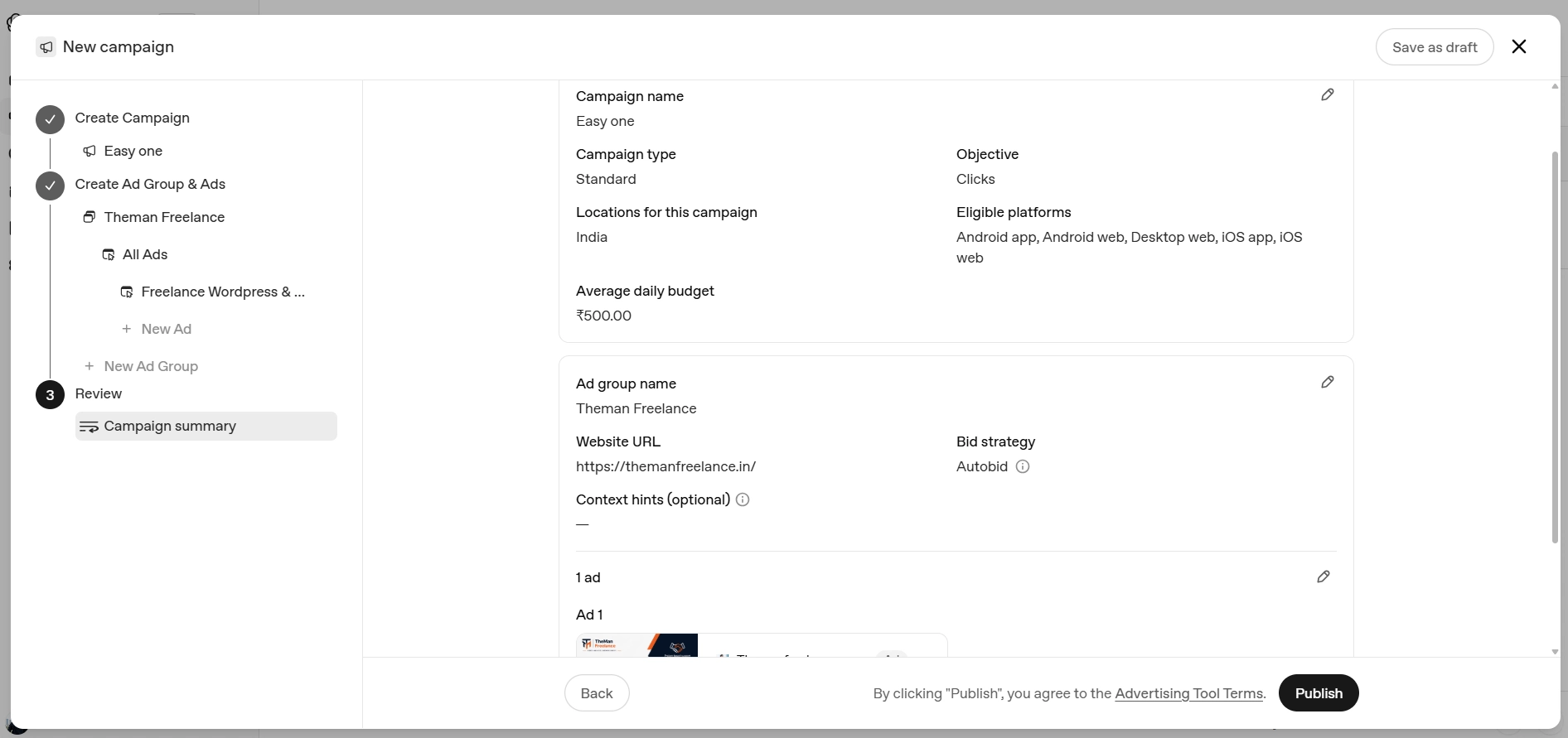
Ads must pass OpenAI’s review before they can go live. OpenAI Help Center
Step 13: Monitor Your Results
After launch, don’t judge the campaign only by impressions.
Look at:
Impressions
How many times your ad was shown.
Clicks
How many users visited your website.
CTR
Percentage of impressions that generated clicks.
Average CPC
Average cost per click.
Spend
How much you’ve spent.
Conversions
Whether the traffic actually produced the desired action.
Add UTM Tracking
For a website campaign, I strongly recommend adding UTM parameters.
Example:
https://themanfreelance.in/shopify-development/?utm_source=chatgpt&utm_medium=paid&utm_campaign=shopify-developmentThis allows you to identify traffic coming from your ChatGPT advertising campaign inside your analytics platform.
You can then compare:
ChatGPT Ads → Visitors → Leads → Clients
instead of simply looking at clicks.
How Much Do ChatGPT Ads Cost?
ChatGPT Ads currently support CPM and CPC buying, with conversion-optimized options also available depending on campaign eligibility/setup. OpenAI Help Center
For CPC campaigns, OpenAI’s current guidance recommends starting with a maximum bid of $3–$5 USD per click, although the appropriate bid depends on your market, competition and campaign. OpenAI Help Center
For Indian advertisers, the current minimum daily budget listed by OpenAI is ₹725. OpenAI Help Center
Don’t treat the minimum budget as the recommended budget.
Your actual advertising budget should depend on:
- Customer value
- Lead value
- Conversion rate
- Target market
- Competition
- Campaign objective
ChatGPT Ads for a Freelance Developer: My Approach
If I were running ChatGPT Ads for a freelance development business, I wouldn’t create one generic campaign saying:
I’d separate the campaigns by customer intent.
Campaign 1 — Shopify Leads
Ad Group: Shopify Development
Context:
Shopify developer, Shopify store redesign, Shopify Liquid, Shopify API, Shopify customization, Shopify speed optimization
Landing page:
Campaign 2 — WordPress Leads
Ad Group: WordPress Development
Context:
WordPress developer, custom WordPress development, WooCommerce developer, WordPress redesign, WordPress speed optimization
Landing page:
Campaign 3 — Website Redesign
Ad Group: Website Redesign
Context:
website redesign, website modernization, improve website UX, redesign old website, website performance
Landing page:
This is much more relevant than sending every potential customer to the homepage.
7 Mistakes to Avoid With ChatGPT Ads
1. Using one generic advertisement
Create different messages for different customer intents.
2. Sending every visitor to your homepage
Match the landing page with the advertisement.
3. Treating context hints like Google keywords
Context hints help guide relevance, but they’re not exact-match keywords. OpenAI Help Center
4. Using vague ad copy
Instead of:
“We build amazing websites.”
Say:
“Custom Shopify development, Liquid and API integrations.”
5. Ignoring mobile users
Your landing page needs to work extremely well on mobile.
6. Measuring only clicks
A cheap click isn’t necessarily a good lead.
Measure:
Click → Engagement → Lead → Customer
7. Launching without tracking
Use UTM parameters and conversion measurement from the beginning.
Are ChatGPT Ads Worth Testing in 2026?
For some businesses, yes—but treat them as a channel to test, not a guaranteed lead source.
The interesting part isn’t simply that advertisements can appear in ChatGPT.
It’s the combination of:
Conversational intent + relevant advertising + contextual landing pages.
A person isn’t necessarily typing:
“Shopify developer.”
They might be explaining an entire business problem.
That gives advertisers an opportunity to position their solution around the problem the customer is trying to solve.
And that’s where I think ChatGPT advertising becomes particularly interesting.
Final Takeaway
ChatGPT Ads represent a different way of thinking about digital advertising.
Instead of asking only:
“What keyword should I target?”
Businesses should also ask:
“What problem is my customer trying to solve?”
Build the campaign around that problem.
Then create:
Relevant context → Relevant ad → Relevant landing page → Relevant conversion
For businesses that already have strong service pages and clear offers, ChatGPT Ads are worth testing as another potential source of qualified website traffic and leads.